By QuickSummit · Updated July 27, 2026
The claim that AI agents will eliminate 80% of apps sounds like a reason to stop renewing software. It is not. The “80%” figure is an informal prediction about how people may interact with software—not a measured adoption forecast or a finding that 80% of SaaS products will disappear.
For an SMB, the useful question is narrower: Does the agent embedded in a tool you already pay for complete a valuable workflow well enough to justify its price, permissions, and oversight?
We implement workflow automation for clients, and our position is that SaaS should be evaluated at the workflow level. Keep the underlying system when it remains the best source of record. Enable its agent when the economics and controls hold up. Replace a function only when another approach produces the same verified outcome with lower total cost or risk.
All prices and product features in this article were checked as of July 27, 2026. QuickSummit has no affiliate relationship with the vendors or research firms mentioned.
What the “80% of Apps” Prediction Actually Says
Several different statements have been compressed into one misleading statistic.
First, OpenClaw creator Peter Steinberger predicted that 80% of apps would disappear as agents replaced interfaces for tasks such as logging meals and managing reminders. The argument is about the user interface: software may continue operating as databases, APIs, and transaction systems even when users stop opening its dashboard. It is an informed opinion, not a time-bound market forecast. ContextSDK documented the argument in March 2026.
Second, IDC reported that more than 80% of nearly 900 companies surveyed in February 2025 believed agents were becoming “the new enterprise apps,” prompting them to reconsider packaged-software investments. That measures buyer expectations. It does not mean 80% had deployed agents or planned to cancel applications. In the same survey, 76% said agents made supplier consolidation more likely. IDC published those findings in its enterprise-application analysis.
Third, Gartner issued the clearest time-bound adoption forecast:
The best-supported forecast is 40%, not 80%. Gartner said task-specific AI agents would appear in up to 40% of enterprise applications by the end of 2026, rising from less than 5% in 2025. Gartner separately said most enterprise apps would have assistants, which are not autonomous agents. Source: Gartner, August 26, 2025.
The practical conclusion is not that your CRM, accounting platform, or help desk has 18 months to live. It is that more vendors will place an AI layer between users and the underlying application. SMB buyers will need to distinguish useful execution from an upgraded chat box.
AI Assistant, Embedded Agent, or Agentwashing?
We use four tests to classify a feature: trigger, plan, act, and stop.
An assistant responds to a prompt. It might summarize a customer record, draft an email, or explain a report, but a person still controls the workflow.
A genuine embedded agent can receive a goal or event, choose a sequence of steps, use approved tools, change records, and determine when to finish or escalate. OpenAI similarly defines agents as systems that independently accomplish tasks by using a model to manage workflow execution and tools to gather information or take action. Simple chatbots and single-turn model features do not meet that definition. OpenAI’s agent implementation guide explains the distinction.
Traditional automation is different again. A rule such as “when an invoice is approved, copy its total into the accounting system” follows a predetermined path. An agent is useful when the path depends on context, exceptions, or unstructured information. Our comparison of AI automation and traditional automation covers where each approach fits.
Embedded AI does not automatically mean autonomous action. Gartner describes assistants as tools that simplify tasks but still depend on human input; task-specific agents can perform complex end-to-end work. For buyers, the practical test is whether the feature can plan and execute actions, not whether the vendor labels it an agent. Source: Gartner, 2025.
If a vendor says “agent,” ask for a run log. It should show the trigger, plan, tools selected, inputs, outputs, errors, and final status. Microsoft’s Copilot Studio documentation, for example, shows an activity map exposing an agent’s steps and the data exchanged with each action.
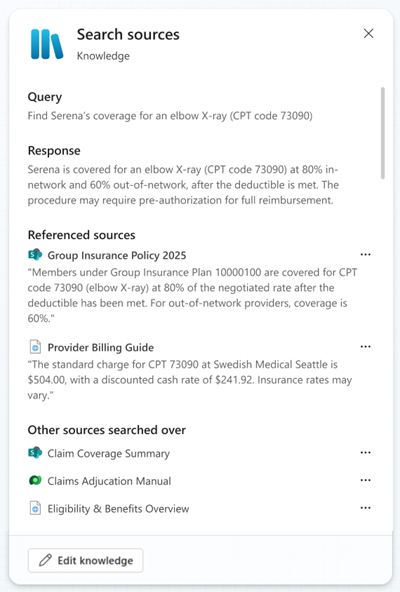
Example of the execution evidence buyers should request. Source: Microsoft Learn, updated June 22, 2026.
A polished answer is not proof of agency. A visible, testable action trail is.
How Embedded Agents Will Change Your SaaS Stack
We expect agents to reduce the amount of time employees spend moving between dashboards. We do not expect reliable systems of record to become unnecessary merely because a new interface can operate them.
A CRM still holds customer history. An accounting platform still maintains the ledger. An inventory system still controls quantities and locations. The agent may become the interface, but the underlying application continues to supply data integrity, permissions, APIs, and transaction logic.
This leads to three practical decisions:
| Decision | Use it when | Evidence required |
|---|---|---|
| Keep | The application remains a necessary system of record, but its agent adds little value | Reliable exports, suitable integrations, and a documented manual or deterministic workflow |
| Enable | The embedded agent completes a defined workflow without duplicating infrastructure | Test results, scoped permissions, run logs, approval controls, and positive workflow-level cost math |
| Replace | Another system can reproduce the business outcome and safely preserve required data | Migration test, rollback plan, total switching cost, record retention, and verified output quality |
“Replace” should normally mean replacing a function before replacing an entire platform. A cross-application agent might take over lead routing while the CRM remains the source of record. Removing the CRM would require a separate data, compliance, and continuity decision.
Pricing will also become less comparable. As of July 2026, Microsoft 365 Copilot lists at $30 per user per month and includes qualifying employee-facing agent usage subject to fair-use limits. Separate Copilot Studio activity is metered in Copilot Credits: a generative answer consumes two credits, an agent action five, and tenant-graph grounding ten. Microsoft documents the rates and licensing conditions.
Salesforce uses a different unit. Agentforce Flex Credits list at $500 per 100,000 credits; a standard action uses 20 credits, or $0.10 at list price. Salesforce also lists a $5-per-user monthly Agentforce user license that requires Flex Credits. Salesforce’s current pricing page provides the full conditions.
A seat price, credit price, or action price is therefore only an input. The comparable metric is cost per successful business outcome.
The Seven-Point Audit for Evaluating an Embedded Agent
We score each category from zero to two, for a maximum of 14 points. This is our practical keep-enable-replace audit, not an industry certification.
| Audit category | 0 points | 1 point | 2 points |
|---|---|---|---|
| 1. Workflow definition | No named workflow or owner | Workflow described, but volume or baseline is missing | Owner, trigger, volume, cycle time, errors, and desired outcome are measured |
| 2. Real agency | Produces text only | Performs one predefined action | Plans and executes multiple steps, recognizes completion, and escalates exceptions |
| 3. Data and permissions | Broad credentials or unclear data use | Roles exist, but retention or connector scope is uncertain | Least-privilege access, approved sources, retention terms, and separate service credentials |
| 4. Reliability evidence | Vendor demo only | Happy-path testing | Representative test set with pass, correction, failure, and escalation rates |
| 5. Control and observability | No useful logs or rollback | Partial history or approvals | Complete run log, high-risk approvals, retry limit, pause control, and tested rollback |
| 6. Full economics | Price quoted without usage math | Rough monthly estimate | Implementation, seats, consumption, supervision, failures, and cost per success included |
| 7. Portability | No usable export or configuration ownership | Partial export | Data export, documented API, transferable workflow logic, and defined offboarding path |
Our verdict thresholds are:
- 0–5: Keep the current process and do not enable autonomous actions.
- 6–9: Test in assistant or shadow mode. The feature may help, but it has not earned write access.
- 10–12: Enable one constrained workflow with approvals and weekly review.
- 13–14: Consider broader use after the pilot meets its exit criteria.
A high total cannot cancel a critical red flag. Unrestricted deletion, payment authority, invisible activity, unacceptable data terms, or an absent rollback plan should block deployment.
This caution reflects established security guidance. OWASP identifies excessive functionality, permissions, and autonomy as the three main causes of “excessive agency.” It recommends limiting tools and functions to the minimum required. See OWASP’s LLM06:2025 guidance. NIST’s AI Risk Management Framework likewise calls for documented scope, human oversight, production monitoring, incident response, and regular evaluation. The NIST AI RMF Core lists those controls.
If the workflow itself is still unclear, document it before buying AI. Our business process automation guide provides a starting structure.
Cost Math: Enable the Add-On, Build Across Apps, or Do Nothing?
SMB AI spending remains modest. Bluevine reported that 28% of surveyed small businesses spend $25–$99 per month on AI tools, 16% spend $100–$249, and 10% spend $250 or more. That makes per-seat AI add-ons material enough to require workflow-level ROI math before renewal. Source: Bluevine, 2026 Small Business AI Trends Report.
Bluevine’s survey covered 942 U.S. small-business owners with 2–249 employees and annual revenue between $50,000 and $5 million. It was fielded April 7–9, 2026, with a reported margin of error of approximately plus or minus three percentage points.
Here is a hypothetical model for a 12-person operations team. These are stated assumptions, not client results:
- 800 monthly cases
- Three manual minutes per case
- $30 loaded labor cost per hour
- 60% of saved time can be reassigned to useful work
- Embedded add-on: $30 per user per month
- Implementation: 12 hours at $125 per hour
- Ongoing review: two manager hours per month at $60 per hour
The current workflow consumes 40 hours monthly:
800 cases × 3 minutes ÷ 60 = 40 hours
Its monthly labor capacity is $1,200. Because we assume only 60% becomes usable capacity, the benefit available to count is $720 per month—not the full $1,200.
Option 1: Enable the embedded add-on
Monthly recurring cost:
(12 users × $30) + (2 review hours × $60) = $480
Ninety-day cost:
$1,500 implementation + ($480 × 3) = $2,940
If the agent captures the assumed $720 monthly benefit, the 90-day benefit is $2,160. The pilot is therefore $780 short of break-even after 90 days.
Over 12 months, the cost is $7,260 and the modeled benefit is $8,640, producing $1,380 in net value and a 19% ROI on cost. That result is positive but not guaranteed; it depends on the measured time actually becoming useful capacity.
Option 2: Build a cross-application agent
Assume a 40-hour build at $125 per hour, $250 monthly platform and model usage, four monthly oversight hours at $60, and 75% workflow capture.
Ninety-day cost:
$5,000 build + (($250 + $240) × 3) = $6,470
Ninety-day benefit:
40 baseline hours × 75% × $30 × 3 = $2,700
That leaves the build $3,770 short after 90 days. At 12 months, modeled cost is $10,880 versus $10,800 in labor capacity. It does not clear the investment threshold unless it also removes subscriptions, reduces verified rework, or handles more volume.
Option 3: Do nothing
Doing nothing requires no new cash, but it leaves the modeled $720 in recoverable monthly capacity untouched. That is an opportunity cost, not an accounting saving. If the team cannot productively redeploy saved time, even that $720 should be excluded.
The formula we use is:
Annual net value = verified labor capacity + avoided subscriptions + verified rework avoided − implementation − licenses − usage − oversight
ROI = annual net value ÷ total annual cost
Our longer guide explains how to calculate AI automation ROI without treating every saved minute as cash.
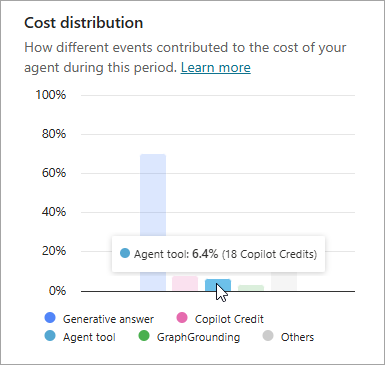
Consumption reporting should be part of the pilot evidence. Source: Microsoft Learn, updated April 1, 2026.
A 90-Day Rollout Plan With Measurable Exit Criteria
Days 1–15: Establish the baseline
Choose one workflow with one accountable owner. Record at least 50 real cases, including volume, handling time, correction rate, failure types, and escalation frequency. If the workflow produces fewer than 50 cases in 15 days, extend measurement or choose a higher-volume process.
Exit criterion: The owner can state the current cost per completed case and identify which actions the agent may read, draft, update, or never perform.
Days 16–30: Run in shadow mode
Give the agent approved test data or read-only production access. Let it recommend actions without executing them. Test normal cases, incomplete inputs, duplicates, permission failures, and deliberately ambiguous requests.
For a low-risk administrative workflow, we would normally require at least 30 shadow cases, zero unauthorized access events, and a documented explanation for every failure before allowing writes.
Exit criterion: The team agrees on a pass threshold, correction threshold, retry limit, escalation rule, and list of actions requiring approval.
Days 31–60: Limit production exposure
Route 10%–25% of eligible volume through the agent. Require human approval for external messages, record deletion, financial changes, and other consequential writes. Cap automated retries at two unless testing supports a different limit.
A reasonable low-risk pilot target is at least 90% successful completion, fewer than 15% of outputs requiring material correction, 100% logging, and zero unauthorized actions. These are recommended starting thresholds, not universal benchmarks.
Exit criterion: Cost per verified successful case is below the agreed manual baseline, and rollback has been tested rather than merely documented.
Days 61–90: Expand or stop
Increase volume only after the limited pilot passes. Review failures and consumption weekly. Sample at least 100 completed outputs across common and unusual cases before removing any approval step.
Exit criterion: The workflow meets its quality, cost, security, and escalation thresholds for two consecutive weeks. If it fails the same gate twice, reduce its scope, return it to assistant mode, or disable it.
The objective is not to prove that an agent can work. It is to decide whether this specific agent deserves a durable place in your operation.
If you want an independent workflow audit, implementation plan, and cost model before enabling another SaaS add-on, QuickSummit’s AI automation services can help you make the keep-enable-replace decision with measurable criteria.
Freshness note: Revalidate the adoption statistics, vendor capabilities, screenshots, and pricing after December 31, 2026, when Gartner’s forecast window closes, or sooner if Gartner or IDC publishes a replacement enterprise-application forecast.